


In this article
- Why writing chemical equations digitally can be difficult
- What is ChemType?
- Why ChemType is the ideal tool for writing chemical equations
- How to open ChemType from MathType
- ChemType for educators and online chemistry workflows
- ChemType vs generic chemical equation generators
- Writing chemical equations more efficiently with ChemType
Writing chemical equations digitally should be accurate and efficient. In reality, many educators, students, and STEM professionals still rely on generic text editors that make chemistry notation unnecessarily difficult. From reaction arrows and ion charges to equilibrium symbols and molecular formulas, chemistry requires specialized formatting that standard tools are not designed to handle well.
If you need to write chemical equations online, using the right tool can make a significant difference. ChemType is the chemistry-focused interface included with MathType, designed specifically to make chemical notation intuitive, fast, and professionally formatted across digital environments.
Why writing chemical equations digitally can be difficult
Chemistry notation goes far beyond plain text. Even a relatively simple equation such as
requires correct subscripts, spacing, and reaction symbols to be readable and scientifically accurate.
When working in standard editors, users often struggle with:
- Subscripts and superscripts
- Reaction arrows and equilibrium symbols
- Ion charges and state notation such as (s), (l), (g), and (aq)
- Chemistry-specific symbols and molecular formatting
- Maintaining consistent notation across documents and platforms
This is why many users look for a chemical equation generator, hoping for a faster, cleaner way to create chemical notation.

What is ChemType?
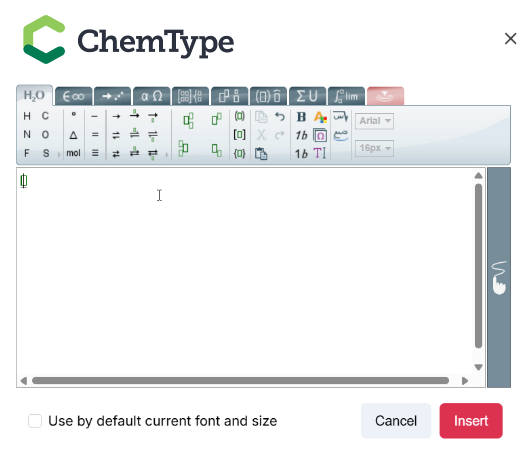
ChemType is the chemistry-oriented interface included with MathType. While MathType is a professional equation editor widely used in STEM education, ChemType extends those capabilities specifically for chemistry workflows, making it easier to create chemical equations, reactions, formulas, and scientific notation.
Rather than forcing chemistry users to adapt math-focused tools, ChemType provides a workspace built around the notation chemists actually use.
ChemType is available in:
- MathType Add-in: for users working in applications like Microsoft Word, where MathType is integrated directly into the software interface.
- MathType Add-on: for browser-based environments and supported online platforms where MathType is added as an extension.
- HTML editor integrations: for users creating chemistry content directly inside web-based editors, educational platforms, or digital publishing environments.
One important advantage is simplicity: ChemType comes included with a MathType license at no additional cost.
Why ChemType is the ideal tool for writing chemical equations
One of ChemType’s biggest strengths is that it removes the friction that comes with manually formatting chemistry notation.
Traditional equation editors may support some scientific symbols, but chemistry has its own logic and visual language. ChemType addresses this with a chemistry-specific interface that prioritizes the symbols and structures users need most frequently.
Whether you are writing a straightforward acid-base reaction like
or more advanced notation such as reversible reactions like
the workflow feels significantly more natural.
Instead of manually adjusting subscripts, hunting for arrows, or improvising with plain text formatting, users can build equations with the speed and consistency expected from a professional STEM tool.
This makes ChemType particularly useful for educators preparing materials, students completing assignments, and institutions looking for standardized scientific notation tools.
How to open ChemType from MathType
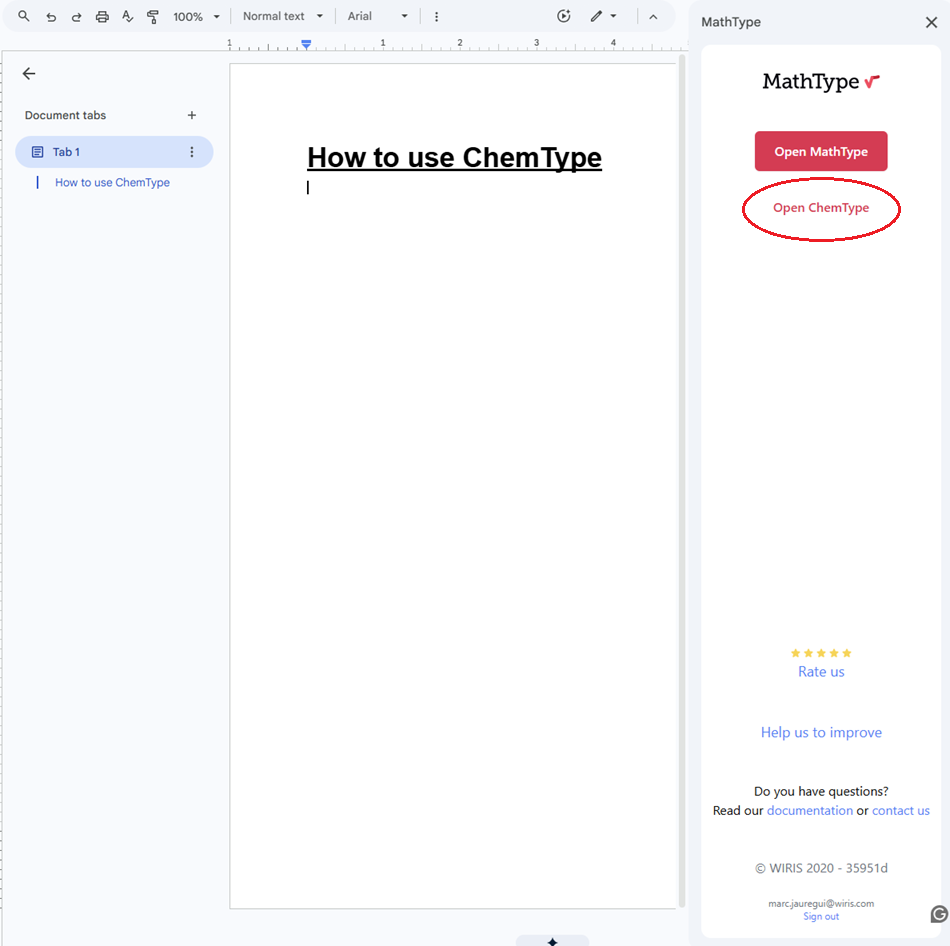
One common question from users is how to access ChemType from within MathType. Fortunately, the process is simple.
- Open MathType from your supported environment, such as Microsoft Word, your LMS, or a compatible HTML editor.
- Inside the MathType editor, locate the interface selector or toolbar options.
- Switch from the default math-focused interface to ChemType.
- Start writing chemical equations using the chemistry-specific symbols and templates.
For users already familiar with MathType, the transition feels immediate and intuitive.
ChemType for educators and online chemistry workflows
Teaching chemistry in digital environments requires more than a generic equation editor. Educators need tools that allow them to create clean scientific notation quickly, whether they are preparing lesson content, building assessments, publishing online materials, or designing activities inside learning platforms.
Students face similar challenges. When chemistry notation is difficult to write digitally, assignments often end up filled with improvised formatting that reduces clarity and makes evaluation harder.
For institutions working in online chemistry environments, consistency matters just as much as usability. Scientific notation needs to remain readable across systems, accessible to both educators and learners, and fast enough to support everyday teaching workflows.
This is where ChemType becomes particularly valuable.
Assessment creation
Creating chemistry assessments often involves repetitive formatting work that becomes unnecessarily time-consuming in generic editors.
ChemType is equally powerful for physical chemistry and thermodynamics modules. Educators can effortlessly format complex thermodynamic formulas to test students on system changes, easily rendering standard equations like:

With the ability to quickly input Greek symbols and superscripts for standard state conditions, setting up physical chemistry exams becomes seamless.
With ChemType, these tasks become significantly faster because the notation tools are already adapted to chemistry workflows. Instead of manually adjusting every equation, educators can focus on designing meaningful questions and instructional content.
LMS and digital learning content
Modern chemistry education increasingly takes place on digital platforms. When educators create chemistry content in LMS environments, the reliability of formatting becomes critical. Poorly rendered equations create confusion and interrupt the learning experience.
Because ChemType integrates within supported MathType environments, institutions can create chemistry materials with consistent notation across their teaching ecosystem.
Student assignment submission
Students benefit from the same clarity. Instead of approximating chemistry notation with keyboard shortcuts or plain text substitutions, they can submit properly formatted reactions, molecular formulas, and chemical expressions.
This improves readability for instructors while helping students communicate scientific ideas more accurately.

ChemType vs generic chemical equation generators
Many users searching for a chemical equation generator are looking for a quick online solution. While free tools may offer basic functionality, they often come with significant limitations.
Some are designed only for isolated equation generation rather than full educational workflows. Others lack formatting flexibility, integration support, or consistency across platforms.
ChemType takes a different approach. Rather than functioning as a simple standalone generator, it provides a professional chemistry notation environment built into the broader MathType ecosystem. This makes it far more practical for educators, institutions, and regular STEM users who need chemistry notation as part of larger digital workflows.
Writing chemical equations more efficiently with ChemType
If your goal is to write chemical equations accurately in digital environments, ChemType offers a much more practical solution than forcing chemistry notation into general-purpose editors.
By combining a chemistry-focused interface with the reliability of MathType, ChemType helps educators, students, and STEM professionals create clean scientific notation quickly and consistently.
Because it is included with every MathType license at no additional cost, it also removes the complexity of adopting a separate chemistry tool. For anyone working regularly in online chemistry, ChemType provides a faster, clearer, and more professional way to create chemical notation.
Share


Discover why thousands trust MathType
Enjoy 30 days of free access to MathType for Office Tools.